
Getting verified on Google My Business is one of the most important steps to rank your business in local search. However, many business owners fail video verification because they miss key details or present information incorrectly. Therefore, this guide explains exactly how to pass video verification with a clear structure and a professional script you can follow.
What Google Wants to See in Video Verification
Firstly, Google is trying to confirm that your business is real, active, and located where you claim. In other words, your video must prove three main things:
- Your physical location exists
- Your business operates there
- Your team actually performs the service
Secondly, the video must be continuous. That is to say, do not pause, edit, or cut anything.
Step 1 – Start Outside and Show Your Location
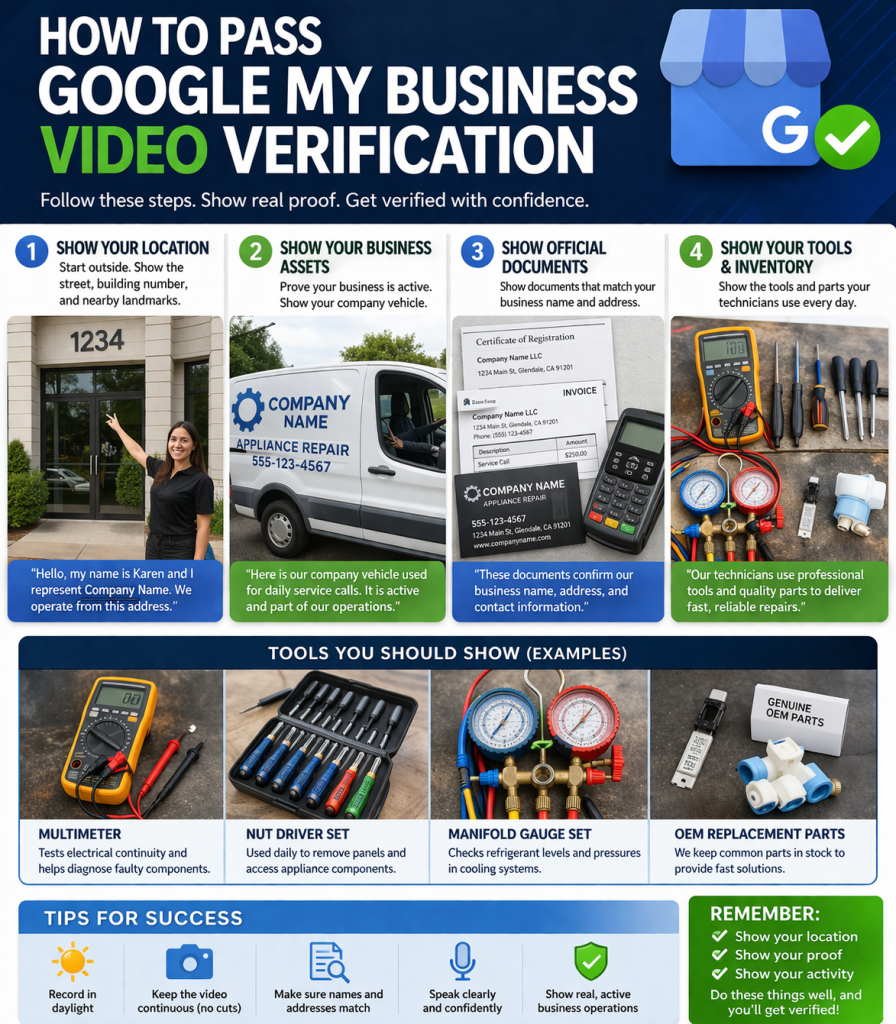
Begin your video outside your business location. Show the street, nearby landmarks, and building number clearly.
Use a simple script like this:
“Hello, my name is Mike and I am an official representative of “Company Name“. Our team operates from this location at Address. I am showing the building number and the street to confirm our physical location.”
After that, slowly move your camera to show the entrance or surrounding area.
Step 2 – Show Your Business Assets
Next, prove that your business is active. For service-based businesses, vehicles are very important.
Say something like:
“I am now showing our company vehicle. Our technicians use this van for daily service calls. The vehicle is active and part of our working fleet.”
Make sure:
- The vehicle is real and accessible
- If possible, show branding or tools inside
- The vehicle looks operational
Step 3 – Show Official Business Documents
After that, move indoors or to a stable surface and show documents clearly.
Use this structure:
“Please view our official documents to verify our business identity.”
Then show each item slowly:
- Company registration document (name + address visible)
- Invoice with matching business details
- Business card
- Payment terminal
Important tips:
- Names and addresses must match your listing exactly
- Avoid blurry footage
- Do not rush
Step 4 – Show Tools and Real Work Equipment
Now prove that your business actually performs the service it claims.
Say:
“Our technicians use professional tools daily to complete service calls.”
Show items like:
- Multimeter
- Nut driver set
- Manifold gauge
- Replacement parts
Explain briefly what they are used for. For example:
“This tool is used to test electrical components and diagnose issues in appliances.”
Step 5 – Keep the Video Natural and Continuous
Most importantly, do not overthink the video. Google prefers real, unedited footage.
Avoid:
- Cuts or edits
- Fake setups
- Stock items that are not used
Instead:
- Walk naturally
- Speak clearly
- Show real working conditions
Common Mistakes That Cause Verification Failure
Many businesses fail for simple reasons. However, you can avoid them easily:
- Address does not match documents
- No clear exterior location shown
- No proof of actual work tools
- Video is too short or incomplete
- Poor lighting or blurry footage
Because of this, always double-check everything before submitting.
Pro Tips to Increase Approval Chances
To improve success rate:
- Record during daylight
- Use a steady camera
- Speak clearly and confidently
- Show more than the minimum required
In addition, include extra proof like:
- Inside workspace
- Storage area
- Branded materials
Final Script You Can Use
Here is a clean version you can follow:
“Hello, my name is Karen and I represent Company Name. We operate from this address. I am showing the building number and surrounding area to confirm our location.
Here is our company vehicle used for daily service calls. It is active and part of our operations.
Now I am showing our official documents including registration, invoice, and business card, all confirming our business details.
Finally, here are the tools and parts our technicians use daily to perform services for customers.”
Why This Works
This structure works because it matches exactly what Google Business Profile requires.
To sum up, your goal is simple:
- Show location
- Show proof
- Show activity
If you follow these steps, your chances of passing verification increase significantly.